The classroom OPS market in 2026
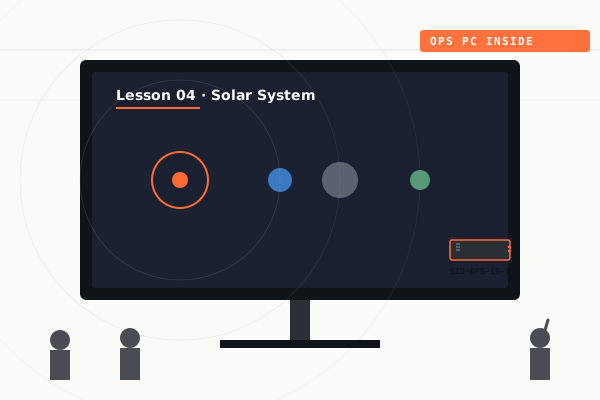
Globally, education is the single largest market for OPS PC modules. School districts, universities, and vocational training centers are the highest-volume buyers, often in 50- to 5,000-unit batches. The market spans developed economies refreshing aging IFP fleets and emerging markets deploying their first smart classrooms.
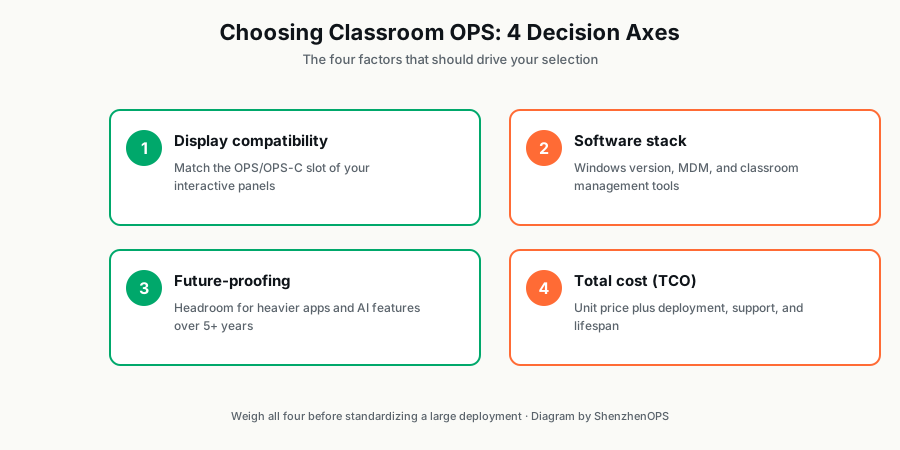
For procurement managers and IT directors specifying OPS for education, the decision space has four axes: display compatibility, software stack, future-proofing, and total cost of ownership. Get all four right and a fleet runs for 6–8 years with minimal support overhead. Get one wrong and you're managing tickets for the next decade.
Axis 1: Display compatibility
Before specifying OPS, you must know exactly which displays you'll deploy with it.
If you've already chosen the display
Pull the product spec sheet. Look for "OPS slot" or "OPS-C slot" in the specifications. Some examples:
- Most 65"–86" interactive flat panels from major Asian display brands accept Standard OPS or OPS-C
- Many newer thin-bezel models (2022+) accept OPS-C 30mm only
- Very large displays (98" and above) often accept OPS-C 42mm for thermal reasons
If the spec sheet is unclear, contact the display manufacturer's regional office directly. Don't trust the reseller; they may not know the difference.
If you're choosing displays and OPS together
This is the better path for a new deployment. Standardize on a single display model and a single OPS form factor across the entire fleet. The IT savings over 5 years from a homogeneous fleet are substantial — single firmware image, single replacement-parts inventory, single training curriculum for teachers.
Axis 2: Software stack
What will teachers actually run on these things? The answer drives CPU choice more than anything else.
Microsoft Teams Rooms / Zoom Rooms certified
If your district mandates Microsoft Teams Rooms or Zoom Rooms certified hardware, you need an Intel i5-class CPU minimum. The certification specifies minimum RAM (16 GB), specific Intel NIC chipsets, and specific WiFi modules. Cheaper N100 modules don't meet the bar.
Smart classroom software (Google for Education, Microsoft Education, etc.)
Most cloud-based classroom suites (Google Classroom, Microsoft Education, Promethean ActivPanel software, SMART Notebook) run fine on Intel N100 for single-application use. Where they struggle is multi-app workflows: screen recording while running a presentation while a student mirrors their tablet over WiFi. For those workflows, step up to i5.
Local applications (CAD, simulations, video editing)
For vocational training in CAD, video production, or 3D simulation, only the i7-class or Core Ultra modules deliver acceptable performance. N100 will frustrate students; i5 will work but feel slow.
AI tutors / language learning with on-device translation
For 2025+ deployments adding AI-powered tutoring or real-time multilingual translation in the classroom, the Intel Core Ultra modules with built-in NPU are the differentiator. They run inference locally without cloud round-trips — important for both response time and data privacy compliance (many education regulators require that student data stay on-premises).
Axis 3: Future-proofing
An OPS module deployed in 2026 should comfortably run software through 2030–2031. CPU and memory are the two levers.
CPU generational considerations
Intel's 12th and 13th generation Core CPUs are mature, well-supported, and will receive driver and security updates through at least 2030. The Core Ultra platform (Meteor Lake / Arrow Lake) is newer and represents Intel's AI-PC roadmap through 2028+.
If your deployment must run for 7+ years, lean toward i7-13G or Core Ultra. If you'll refresh in 4–5 years, i5-12G is the best price/performance.
Memory and storage headroom
For education workloads:
- RAM: 16 GB minimum. 32 GB recommended for multi-app workflows or 5+ year deployments.
- Storage: 256 GB NVMe minimum. 512 GB recommended. The extra cost is small ($20–$40/unit) and prevents storage-related support tickets for years.
Axis 4: Total cost of ownership (TCO)
Per-unit price is one input. TCO includes:
- Per-unit cost (the headline price)
- Shipping and customs (10–25% of unit cost depending on destination)
- Installation labor (typically $20–$50 per classroom in developed markets)
- 5-year support load (driver updates, warranty replacements, RMA handling)
- Energy cost over deployment lifetime (N100: 6–15W; i7: 30–85W; multiply by hours/day × 365 × years × your electricity rate)
For a 200-classroom deployment running 8 hours/day at $0.12/kWh: an N100 fleet uses ~$420/year in electricity vs ~$2,100/year for an i7 fleet. Over 5 years, that's $8,400 difference — a real number, but only meaningful if N100 actually meets your workload.
Specific SKU recommendations by classroom type
K–12 primary classrooms (basic IFP usage)
Recommended: SZO-OPS-N100 (16 GB RAM, 256 GB storage)
Why: Teachers use displays for slide presentation, video playback, basic browsing, and IFP touch interaction. Workload is light, deployment volume is high, and electricity cost matters at fleet scale. N100 covers this comfortably at the lowest TCO.
K–12 secondary classrooms (mixed workflows)
Recommended: SZO-OPS-i5-12G (16 GB RAM, 512 GB storage)
Why: Secondary teachers run more complex workflows — screen recording for absent students, simultaneous mirroring from student tablets, video conferencing with subject specialists. i5 is the workhorse.
University lecture halls
Recommended: SZO-OPS-i7-13G or SZO-OPSC42-i7 (32 GB RAM, 512 GB storage)
Why: Large auditoriums often drive multi-screen video walls, simultaneous recording and streaming, occasional AI/simulation demos. The i7 handles all this without throttling.
Vocational training (CAD, video, design)
Recommended: SZO-OPS-i7-13G or SZO-OPS-Ultra (32 GB RAM, 1 TB storage)
Why: Performance-sensitive applications need the full i7 silicon. Core Ultra adds NPU for AI-assisted CAD workflows.
AI-equipped innovation classrooms (2025+ deployments)
Recommended: SZO-OPS-Ultra (32 GB RAM, 1 TB storage)
Why: Real-time AI translation, on-device tutoring assistants, computer vision experiments — the NPU is the enabler.
Phasing a large deployment
For deployments above 200 classrooms, don't deploy everything in one shipment. Phase it:
- Pilot (10–20 units): Test SKU in 2–3 classrooms across different teacher profiles. Iron out IT integration issues. 3–4 weeks.
- Wave 1 (30–50% of total): First major rollout. Train installers, set up RMA flow, validate energy and support numbers. 2–4 months.
- Wave 2 (remaining 50–70%): Full deployment with proven processes. 4–8 months.
This approach catches problems while they're cheap and lets you renegotiate pricing on Wave 2 if currency or component costs have moved.
What to ask your supplier
- Current stock vs. production lead time for the exact CPU + RAM + storage config
- Pre-shipment QC process (photos? video? burn-in test duration?)
- Warranty terms — including how RMA actually works from your country
- What happens if Intel deprecates your CPU mid-deployment (replacement strategy)
- Spare parts stocking for repair (motherboards, fans) at distributor warehouse
- Reference accounts in education — talk to other districts who've deployed
Sizing OPS PC for a school district or university?
We've shipped OPS modules to education projects from 50 classrooms to 5,000 classrooms. Send us your numbers — we'll quote and advise on phasing, warranty options, and on-site support.
Send project details →