The short answer
If your displays are sold today (2026), they probably accept OPS-C. If your displays were purchased before 2022, they almost certainly accept Standard OPS only. Mixing them in one project is possible but adds friction.
OPS-C is the newer compact form factor (introduced around 2020), designed to fit the thinner chassis of modern interactive flat panels. It's not "better" than Standard OPS in absolute terms — it's better-suited to newer display hardware. For older displays, OPS-C modules physically don't fit.
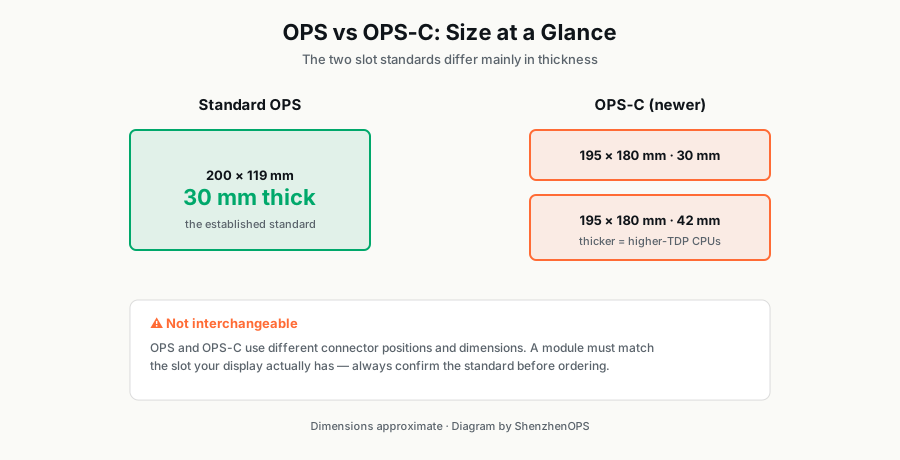
Dimensions side-by-side
| Standard OPS | OPS-C 30mm | OPS-C 42mm | |
|---|---|---|---|
| Width | 119 mm | 195 mm | 195 mm |
| Length | 180 mm | 180 mm | 180 mm |
| Depth (thickness) | 30 mm | 30 mm | 42 mm |
| Connector | JAE TX25 (80-pin) | JAE TX25 (80-pin) | JAE TX25 (80-pin) |
Standard OPS is narrower but the same depth as OPS-C 30mm. OPS-C 42mm gives 12mm of extra depth — that extra depth allows a much larger heatsink and quieter cooling, which is significant for sustained-load deployments.
Compatibility: the deal-breaker
You cannot slot a Standard OPS module into an OPS-C slot or vice versa. The chassis dimensions differ enough that the module won't physically seat into the slot, even though the electrical connector is the same.
Before ordering 100+ modules, ask your display supplier for the exact OPS form factor their model accepts. Some major brands ship "OPS-compatible" displays that actually require OPS-C. The product manual will state which.
Thermal performance
Inside an OPS module, thermal design is constrained by the chassis size. Standard OPS (119×180×30mm) has the tightest thermal envelope, which limits sustained CPU performance under load.
OPS-C 30mm is wider (195mm vs 119mm), so it has more PCB surface area for heat spreaders and more room for larger fans. In practice, this means an OPS-C 30mm module with an i7-13650HX can sustain ~10% higher long-term performance than the same CPU in Standard OPS.
OPS-C 42mm is the thermal champion. The extra 12mm of depth allows roughly 2× the heatsink surface area compared to the 30mm variants. For 24/7 deployments — transport signage, healthcare information, control rooms — OPS-C 42mm is the safest choice for long-term reliability.
Performance differences in real workloads
The CPU silicon is identical across form factors. The difference is sustained-load performance under thermal pressure:
| Workload | Standard OPS (i7) | OPS-C 30mm (i7) | OPS-C 42mm (i7) |
|---|---|---|---|
| 4K video playback (1 hour) | Smooth | Smooth | Smooth |
| Sustained Cinebench R23 | ~22,000 pts (throttled) | ~24,000 pts | ~26,500 pts |
| CPU temp under sustained load | 89°C (throttled) | 84°C | 76°C |
| Fan noise (typical) | ~38 dB | ~36 dB | ~33 dB |
Benchmark data is approximate, based on typical commercial-grade thermal designs. Your specific module may vary ±10%.
Cost considerations
OPS-C modules are typically 10–15% more expensive than equivalent-CPU Standard OPS modules. This is partly because the larger chassis costs more to manufacture, and partly because OPS-C production volumes are still lower (the market is still dominated by Standard OPS in absolute units shipped).
Within the OPS-C family, the 42mm variant is roughly 15–20% more expensive than 30mm because of the additional thermal materials.
Supply chain reality
Standard OPS modules are easier to source. Production volumes are higher, multiple Shenzhen factories make them, and lead times for stock configurations are typically 15–25 days.
OPS-C is more constrained. Fewer factories produce it. Lead times are typically 18–28 days for standard configurations. For custom CPU configurations, expect 4–6 weeks on the first batch.
When to choose what
Choose Standard OPS when
- Your displays were purchased before 2022 and accept Standard OPS only
- You're price-sensitive and your workload is not sustained-heavy (typical signage, education, mid-tier corporate)
- You need fastest lead times and broadest stock availability
- Your project mixes multiple display brands and Standard OPS has the broadest fleet compatibility
Choose OPS-C 30mm when
- Your displays are newer (2022+) and have OPS-C slots
- You want slightly better thermal performance than Standard OPS at modest cost premium
- You're standardizing on a single newer display platform for a multi-year deployment
Choose OPS-C 42mm when
- The deployment runs 24/7 (transport, healthcare, control rooms)
- Workload is sustained-heavy (continuous video processing, real-time analytics, AI inference)
- Noise is a meaningful concern (libraries, courtrooms, quiet office environments)
- You want 3-year extended warranty (some suppliers, including ShenzhenOPS, only offer this on OPS-C 42mm for thermal-stress reasons)
The migration question
If you have an existing fleet of Standard OPS displays and you're now deploying new displays with OPS-C slots, you have two options:
- Run a mixed fleet: maintain Standard OPS for old displays, deploy OPS-C for new ones. Most distributors do this for 2–3 years until the old displays retire naturally.
- Forced standardization: replace all old displays with new OPS-C-compatible models. Only makes sense if displays were due for refresh anyway.
There's no easy adapter to make an OPS-C module work in a Standard OPS slot or vice versa. The chassis simply doesn't fit.
Looking ahead: 2027 and beyond
OPS-C is gradually becoming the dominant form factor. Most major display manufacturers' 2025 product lines ship with OPS-C slots, often alongside legacy Standard OPS for backward compatibility. By 2028, expect Standard OPS to be the minority. The standard isn't going anywhere — Intel and the display industry are deeply committed — but the form factor is shifting.
If you're planning a multi-year deployment starting in 2026, OPS-C is the safer long-term bet for compatibility with future display refreshes.
Not sure which form factor your project needs?
Send us your display model and project size — we'll confirm compatibility and recommend the right SZO configuration.
Ask on WhatsApp →