The 90-second explanation
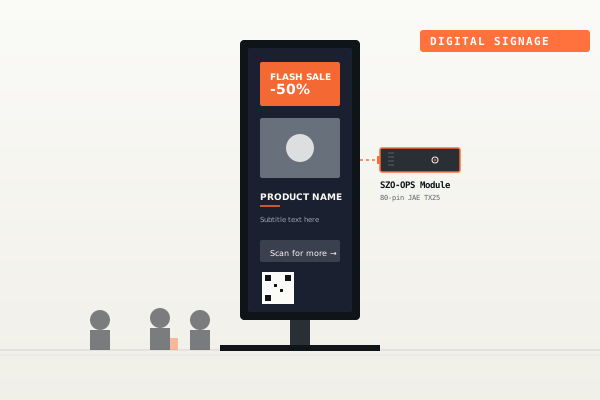
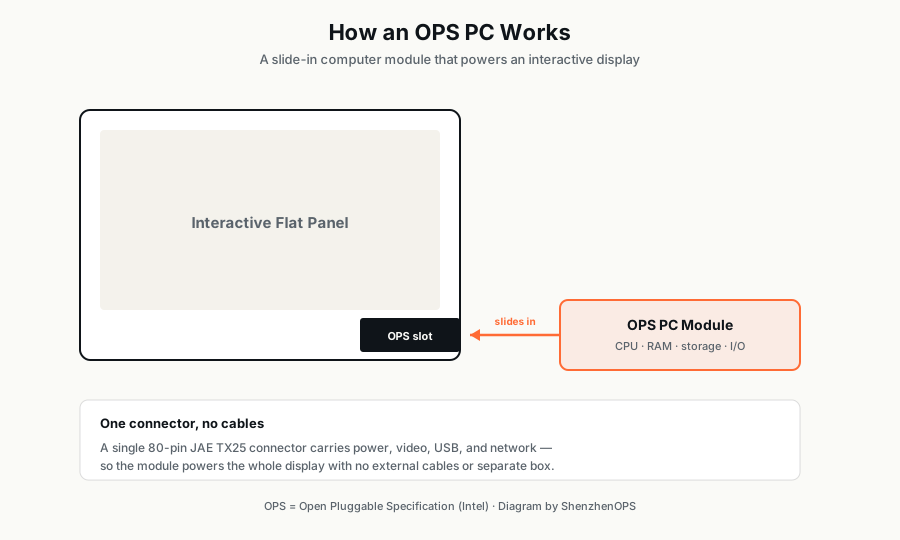
An OPS PC is a slot-in computer module that plugs into the back of an interactive display, digital signage screen, or large-format panel. Instead of running an external PC connected by HDMI cables, you slide a credit-card-thick PC into the display itself — no external box, no cable mess, no separate power supply.
OPS stands for Open Pluggable Specification, an industry standard that Intel introduced in 2010 to fix what was, until then, a fragmented mess. Before OPS, every display manufacturer who wanted to integrate compute used their own proprietary connector and chassis dimensions. A school district that bought 200 NEC displays couldn't use the same compute modules as the 200 Samsung displays in the neighboring district. OPS standardized the chassis dimensions, the connector (JAE TX25, 80-pin), and the signal layout. Today, virtually every interactive flat panel from major brands ships with an OPS slot.
An OPS PC is a standardized, slot-in computer module that lives inside an interactive display, eliminating external PCs and cables.
Why OPS PC instead of an external mini PC?
Three reasons. The first is aesthetic: a meeting room or classroom with a wall-mounted IFP and an external mini PC dangling behind looks unprofessional. An OPS module is invisible from the front — and from the back, all you see is a flush metal panel with vent slits.
The second is logistical: an IT department managing 500 classroom displays prefers a single piece of hardware to manage, not 1,000 pieces. When a display fails, technicians remove and swap the OPS module in 30 seconds, with no rewiring of HDMI/USB/power cables.
The third is reliability: external cables fail. HDMI plugs work loose, USB cables get yanked, power bricks die. An OPS module's connection to the display happens through a single, robust board-to-board connector. Fewer points of failure means fewer support tickets.
How OPS PC differs from a regular mini PC
Internally, an OPS PC is essentially the same hardware as a mini PC: an Intel CPU, DDR memory, M.2 NVMe storage, an Ethernet controller, WiFi, USB controllers. The differences are mechanical and electrical:
- Standardized dimensions: Standard OPS modules are 119mm × 180mm × 30mm. The newer compact variant (OPS-C) is 195mm × 180mm × 30mm or 195mm × 180mm × 42mm.
- JAE TX25 connector: An 80-pin board-to-board connector carries display signals (DisplayPort, HDMI), USB, audio, control signals, and power between the module and the host display.
- Host-supplied power: OPS modules don't have their own power brick. They draw power directly through the OPS connector from the display, typically at 12–19V DC.
- No display output to external connectors by default: The module sends video to the host display through the OPS connector, not through a back-panel HDMI. Most modules still have external HDMI/DP for secondary displays, but the primary output goes through the slot.
OPS vs OPS-C: the two standards in 2026
You'll see both terms in supplier catalogs and on display spec sheets. Here's the short version:
| Standard OPS | OPS-C (Compact) | |
|---|---|---|
| Introduced | 2010 | ~2020 |
| Dimensions | 119 × 180 × 30 mm | 195 × 180 × 30 mm or 42 mm |
| Connector | JAE TX25 (80-pin) | JAE TX25 (same) |
| Common in | Most IFPs sold 2014–present | Newer thin IFPs (2022+) |
| Compatible with | Standard OPS slot only | OPS-C slot only |
The two standards are not interchangeable physically. You can't slot a Standard OPS module into an OPS-C slot or vice versa — the chassis dimensions are different. They use the same connector electrically, which means signal compatibility is preserved, but the metal box has to match the slot.
When buying, the most important question is: what does my host display accept? Check the display's product manual or contact the manufacturer. Some displays clearly state "OPS-compatible"; others specify "OPS-C compatible"; the safest path is to verify before ordering.
The CPU tiers: what's available in 2026
OPS modules ship with a wide range of Intel CPUs, from very-low-power N-series to high-end HX-series. Here's how they break down for typical commercial use cases:
Entry: Intel N100
The Intel N100 (4 cores, 4 threads, up to 3.4 GHz) is the most popular entry-level OPS CPU. It handles 4K digital signage playback smoothly, browser-based dashboards, and basic IFP integration. Power draw is low (6–15W), which makes it the right choice for 24/7 signage deployments where electricity cost is a meaningful factor.
Don't expect Microsoft Teams Rooms certification or smooth multi-app classroom workflows. For those, step up to i5.
Mid: Intel Core i5
The Intel Core i5-12450H (8 cores: 4 performance + 4 efficiency, 12 threads, up to 4.4 GHz) is the most popular mid-tier OPS configuration. It handles screen recording, simultaneous mirror, multi-app workflows, and HD video conferencing without strain. It's the workhorse for education and corporate buyers — the SKU that ships in the highest volume across the entire OPS market.
Flagship: Intel Core i7
The Intel Core i7-13650HX (14 cores: 6P + 8E, 20 threads, up to 5.3 GHz) is the workstation-class option. It drives 4K/8K video walls, runs CPU-based AI inference workloads, and handles the heaviest commercial loads. DDR5 memory and WiFi 6E are standard at this tier.
AI / NPU: Intel Core Ultra
The newest tier (2024+) uses Intel's Core Ultra silicon with a built-in Neural Processing Unit (NPU). The NPU runs AI inference workloads (face detection, gesture recognition, real-time translation) without loading the CPU. For smart kiosks, retail analytics, and AI-powered signage, the NPU pays for itself in reduced cloud API costs and improved responsiveness.
Form factor considerations
Most buyers get this wrong on first orders. The wrong form factor means you receive 100 perfectly good OPS modules that physically don't fit your displays.
Check three things before ordering:
- The exact display model numbers in your project (not just brand)
- Whether they accept Standard OPS or OPS-C
- If OPS-C, whether they accept 30mm or 42mm depth
Display manufacturers typically include this in the product spec sheet. If you can't find it, ask the display supplier directly — they have this answer in 30 seconds. Don't guess.
What about certifications?
If you're importing OPS modules into Russia, the EAEU customs union member states (Belarus, Kazakhstan, Armenia, Kyrgyzstan), you need EAC certification. This is non-negotiable for customs clearance. Many lower-tier suppliers will tell you they have EAC; verify that the certificate is current and covers the exact model number you're ordering.
For the EU market, you need CE and RoHS. For the US and FCC-aligned Latin American markets, you need FCC. For domestic China sales, CCC is required.
Top-tier OPS suppliers maintain all of these certifications. If your supplier hesitates when you ask for current certificate copies, that's a red flag.
What does an OPS PC cost in 2026?
FOB Shenzhen pricing for SZO-branded OPS modules, approximate ranges:
| Configuration | Per-unit (50–100 unit order) |
|---|---|
| SZO-OPS-N100 (entry) | $120 – $180 |
| SZO-OPS-i5-12G (popular) | $260 – $380 |
| SZO-OPS-i7-13G (flagship) | $480 – $720 |
| SZO-OPSC30-i5 (slim OPS-C) | $290 – $560 |
| SZO-OPSC42-i7 (thick OPS-C) | $340 – $640 |
| SZO-OPS-Ultra (AI / NPU) | $580 – $880 |
Prices scale down at higher volumes. For a 500-unit order, expect 8–12% lower per-unit pricing; for 2,000+ units, 15–20%. Memory and storage upgrades typically add $40–$200 per unit depending on capacity.
White-label vs SZO-branded
For orders of 50 or more units, every OPS module from ShenzhenOPS can ship under your own brand — your logo on the chassis, your part numbers, your packaging. We call this white-label production. For smaller orders, products ship under the SZO brand.
This is a meaningful business choice. If you're a distributor selling through your own channel, white-label preserves your brand equity. If you're a system integrator who values supplier-managed warranty handling, SZO-branded with a private re-labeling sticker may be fine.
Common buyer mistakes
- Buying without checking display compatibility. Standard OPS vs OPS-C, 30mm vs 42mm. Verify before ordering.
- Skipping the certification check. Especially for EAC into Russia. A 100-unit order rejected at customs costs you 6 weeks and your customer's trust.
- Sizing the CPU wrong. Don't pay for i7 if N100 handles your workload. Don't pay for N100 if you'll be running 4K dual-display Microsoft Teams Rooms.
- Trusting only the lowest price. Direct factory may be 3–8% cheaper, but if their English is poor, their EAC certificate is expired, and they can't ship mixed SKUs in one container — the apparent saving disappears in support overhead.
Where to go from here
If you're sourcing for a project in Russia, the Middle East, Southeast Asia, or Latin America — and you want a supplier that replies in English within 24 hours, offers EAC out-of-the-box, supports orders from 10 to 10,000 units, and can ship under your brand for 50+ unit orders — we'd be a good fit to talk.
Need to source an OPS PC for your project?
Send us your display size, application, and target volume — we'll match you with the right SZO configuration and full pricing within 24 hours.
Send a project brief →