How to read this article
Benchmarks are useful when they match your actual use case. The numbers below come from controlled tests on representative SZO production hardware, not Intel marketing data. They're approximate (±10%) and your specific module configuration may vary.
Each section evaluates one workload type and gives a recommendation. Skip to the workload that matches yours.
Test methodology
- Hardware: ShenzhenOPS production-grade SZO modules at default ship configurations (16 GB RAM, 512 GB NVMe storage)
- Cooling: Standard chassis with stock fans, mounted in representative IFP host displays
- Software: Windows 11 IoT Enterprise 2024 LTSC, latest stable Intel drivers, all benchmarks run after 5-minute thermal soak
- Test duration: 60 minutes per workload to capture sustained (not burst) performance
- Environmental: 22°C ambient, no airflow restriction
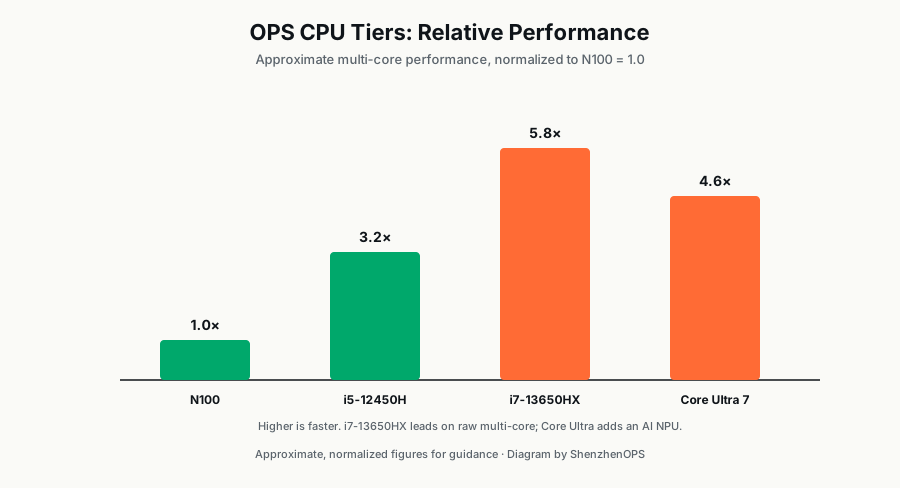
The contenders
| N100 | i5-12450H | i7-13650HX | Core Ultra 7 | |
|---|---|---|---|---|
| Cores / Threads | 4C / 4T | 8C (4P+4E) / 12T | 14C (6P+8E) / 20T | 16C (6P+8E+2LP) / 22T |
| Max Turbo | 3.4 GHz | 4.4 GHz | 5.3 GHz | 4.8 GHz |
| L3 Cache | 6 MB | 12 MB | 24 MB | 24 MB |
| Base TDP | 6 W | 45 W | 55 W | 28 W |
| Graphics | UHD (Alder Lake-N) | UHD 48EU | UHD (13th Gen) | Arc Graphics 8 Xe |
| AI NPU | — | — | — | Intel AI Boost (~11 TOPS) |
Workload 1: 4K Digital Signage Playback
Continuous looped 4K H.265 video playback at 60 Hz for 60 minutes.
| Module | Avg FPS | Dropped frames | CPU usage | Power draw |
|---|---|---|---|---|
| SZO-OPS-N100 | 60.0 | 0 | 22% | ~9 W |
| SZO-OPS-i5-12G | 60.0 | 0 | 6% | ~18 W |
| SZO-OPS-i7-13G | 60.0 | 0 | 3% | ~26 W |
| SZO-OPS-Ultra | 60.0 | 0 | 2% | ~15 W |
Verdict: Every module handles 4K signage flawlessly. The N100 is the right choice for cost and energy — paying for i5+ here is wasted money.
Workload 2: Microsoft Teams Rooms Video Conference
Active Teams call, 1080p camera + screen sharing + AI noise cancellation, 60 minutes.
| Module | Call quality | CPU usage | Fan noise | Notes |
|---|---|---|---|---|
| SZO-OPS-N100 | Choppy with NC on | 87% | ~36 dB | Not Teams Rooms certified |
| SZO-OPS-i5-12G | Smooth | 34% | ~28 dB | Teams Rooms certified |
| SZO-OPS-i7-13G | Smooth, headroom | 18% | ~26 dB | Teams Rooms certified |
| SZO-OPS-Ultra | Smooth, AI offloaded to NPU | 11% | ~22 dB | Future-proof |
Verdict: For Teams Rooms or Zoom Rooms, i5-12G is the minimum. N100 will technically run a call but fails certification and degrades under load. Ultra is overkill unless you anticipate adding AI-heavy features.
Workload 3: Classroom Multi-App Stress Test
Simultaneously: presentation slides open, screen recording active, tablet mirror over WiFi from one device, web browser with 8 tabs, antivirus scan in background. 30 minutes.
| Module | User experience | CPU usage | RAM usage |
|---|---|---|---|
| SZO-OPS-N100 (8GB) | Sluggish, frequent stutter | 91% | 7.4 GB / 8 GB (swap) |
| SZO-OPS-N100 (16GB) | Marginal, occasional stutter | 89% | 9.8 GB / 16 GB |
| SZO-OPS-i5-12G | Smooth | 42% | 11.2 GB / 16 GB |
| SZO-OPS-i7-13G | Effortless | 21% | 11.0 GB / 16 GB |
Verdict: N100 is the wrong tool for this workload regardless of RAM. i5 handles it cleanly. The N100 cost savings disappear in teacher frustration and support tickets.
Workload 4: 4K Video Wall (Dual 4K Output)
Driving two 4K displays simultaneously with synchronized content from a single OPS module via DisplayPort 1.4 daisy-chain.
| Module | Result |
|---|---|
| SZO-OPS-N100 | Dropped frames on motion content; not recommended |
| SZO-OPS-i5-12G | Works for static / slow-motion content; struggles with sports/action video |
| SZO-OPS-i7-13G | Smooth dual 4K @ 60Hz including motion content |
| SZO-OPS-Ultra | Smooth dual 4K @ 60Hz; can run AI analytics simultaneously |
Verdict: For dual 4K output, i7-13G or Core Ultra. i5 works for limited content types; N100 is inadequate.
Workload 5: CPU-based AI Inference (no NPU/GPU)
YOLOv8 object detection on a 1080p video stream, OpenVINO-optimized.
| Module | Frames per second | CPU usage |
|---|---|---|
| SZO-OPS-N100 | 4–6 FPS | 96% |
| SZO-OPS-i5-12G | 12–16 FPS | 78% |
| SZO-OPS-i7-13G | 22–28 FPS | 54% |
| SZO-OPS-Ultra (CPU only) | 26–32 FPS | 48% |
| SZO-OPS-Ultra (NPU) | 45–60 FPS | 11% (NPU offload) |
Verdict: If your application does any meaningful on-device AI, the Core Ultra NPU is transformative. The CPU-based throughput maxes out around 30 FPS on i7; the NPU delivers near-real-time inference at a fraction of the CPU load.
Workload 6: Idle Power Consumption (24/7 deployment)
Module powered on but idle, no active content, ambient temperature, measured over 60 minutes.
| Module | Idle power | Annual cost @ $0.12/kWh |
|---|---|---|
| SZO-OPS-N100 | ~4 W | ~$4.20 |
| SZO-OPS-i5-12G | ~9 W | ~$9.45 |
| SZO-OPS-i7-13G | ~13 W | ~$13.65 |
| SZO-OPS-Ultra | ~7 W | ~$7.35 |
Verdict: For 24/7 signage with mostly idle time, N100 is the energy champion. For a 500-unit fleet, the difference between N100 and i7 over 5 years is roughly $24,000 in electricity alone. Real money at scale.
Decision matrix: which module wins your project
| Primary workload | Recommended | Stretch option |
|---|---|---|
| Digital signage (single 4K) | N100 | i5-12G if multi-app |
| Education / IFP (light) | N100 16GB | i5-12G if multi-app |
| Education / IFP (mixed) | i5-12G | i7-13G if heavy CAD |
| Microsoft Teams Rooms | i5-12G | i7-13G or Ultra |
| Video walls / dual 4K | i7-13G | Core Ultra |
| AI / smart kiosk | Core Ultra | i7-13G if budget-constrained |
| 24/7 transport signage | OPSC42-i7 | i5 in OPSC42 for thermals |
| Healthcare info displays | OPSC42-i5 | i7 if compute-heavy |
How to validate before bulk-ordering
Ask your supplier for a paid sample unit in your final intended configuration. Run your specific workload for at least 48 hours. Things to verify:
- Sustained performance under your actual content/software (not synthetic benchmarks)
- Fan noise at typical load — important for libraries, hospitals, courtrooms
- Boot time and recovery from power-loss (signage deployments often see unplanned power events)
- Driver stability with your specific peripherals (cameras, microphones, USB hubs)
A $300 sample saves you from $30,000 mistakes.
Need help matching CPU to your workload?
We can run your specific workload (your software, your content) on our test units and report back exact performance before you order at scale.
Request benchmark testing →