The 30-second cheat sheet
All three categories use similar internals (Intel CPU, DDR RAM, M.2 NVMe storage, WiFi). What differs is the form factor — and form factor dictates how you install, maintain, and replace the unit. Pick wrong and you're paying twice for the same compute.
| OPS PC | Mini PC | Industrial PC | |
|---|---|---|---|
| Where it goes | Inside a display's OPS slot | Behind/beside a display via HDMI cable | DIN rail, panel mount, or enclosed cabinet |
| Form factor | 180×119×30mm standardized | Varies (130×130 to 230×150mm typical) | Often aluminum-cased, ruggedized |
| Install time | 30 seconds (slide in) | 5-10 min (cables, power, VESA mount) | 15-30 min (mounting, wiring) |
| Cables needed | Zero (one connector) | HDMI + USB + power + Ethernet | Power + I/O cabling |
| Best for | Interactive flat panels w/ OPS slot | Offices, kiosks, hotels, signage w/o slot | Factory floors, harsh environments |
| Typical price (i5) | $260-380 | $210-380 | $180-260 |
OPS PC: zero-cable display integration
An OPS PC is a slot-in compute module that lives inside the back of an interactive flat panel or digital signage display. It connects to the host display via the JAE TX25 80-pin connector — one connection carries video, audio, USB, power, everything.
The case for OPS
- Aesthetic. Nothing visible behind the display. In a corporate boardroom or premium retail environment, this matters.
- Installation speed. 30 seconds. Slide in the module, plug in display power, done. Compare to mini PC installations where the integrator runs HDMI, USB, power, and Ethernet cables behind a 75-inch panel.
- Single point of failure replacement. When the compute fails, slide out the OPS module, slide in a spare. No re-cabling. Lower-skilled technicians can do swaps.
- Power efficiency. One power connection (display's PSU) drives both the display and the OPS — slightly more efficient than two separate AC connections.
The case against OPS
- Requires a host display with an OPS slot. No slot, no fit.
- Thermal envelope is constrained. 30mm chassis limits sustained turbo on i7-class CPUs.
- Slightly more expensive than equivalent mini PC. The standardized form factor and specialized cooling design add ~$20-40 per unit at i5-class.
When OPS is the right call
Classrooms with interactive flat panels (IFPs). Conference rooms with Microsoft Teams Rooms certified displays. Retail signage with OPS-slot-equipped digital signs. Premium installations where the look matters. Any deployment of 50+ displays where installation labor cost is significant.
Mini PC: flexibility above all
A Mini PC is a standalone desktop computer in a small box (anywhere from 130×130mm to 250×200mm). It connects to displays via standard HDMI/DP/USB-C cables, and draws power from a wall outlet.
The case for Mini PC
- Works with any display. Cheap monitor, old TV, projector, IFP without OPS slot — anything with HDMI/DP works.
- Easy to upgrade. Most mini PCs have user-accessible RAM and storage slots. Upgrading is trivial.
- Standalone use cases. A mini PC behind a desk works fine as an office desktop. An OPS PC can't.
- Better thermal headroom. Mini PCs aren't constrained to 30mm; they can run i7/i9 at sustained turbo with room for larger heatsinks.
The case against Mini PC
- Cable clutter. HDMI, USB, power, Ethernet — all visible behind the display.
- Slower to install. Each unit needs proper VESA mounting (or surface placement), then cable management.
- More points of failure. Cables work loose, get yanked, fail. Power bricks die.
- Aesthetic. A consumer-grade plastic box behind a premium display reads as cheap.
When Mini PC is the right call
Hotels (in-room TVs with HDMI). Retail kiosks and ad terminals where the box can be hidden inside the kiosk enclosure. Office workstations replacing tower desktops. Digital signage on consumer-grade screens. Anywhere the display doesn't have an OPS slot.
Industrial PC: built for environments where consumer hardware fails
An Industrial PC (IPC) is a Mini PC with deliberately industrial-grade build: aluminum or steel chassis (instead of plastic), passive heat dissipation (often fanless), DIN-rail or panel-mount options, wide-temperature operation, and ports designed for harsh environments (RS-232/485, terminal blocks instead of Type-C, etc.).
The case for Industrial PC
- Wider operating temperature. Standard IPCs handle 0°C to +60°C; extended-temp variants handle -20°C to +70°C. Consumer mini PCs throttle or shut down above +45°C ambient.
- Better vibration tolerance. Solid-state storage, ruggedized PCB mounting, often no rotating fans. Survives factory floors, mobile equipment.
- Industrial I/O. RS-232/RS-485 for PLC integration, isolated GPIO for industrial sensors, sometimes CAN bus. Not standard on consumer mini PCs.
- Longer product lifecycle. Industrial PC vendors guarantee 5+ year availability of the same SKU. Consumer mini PCs often disappear in 18-24 months.
- Aluminum chassis as heatsink. Cooler operation, lower noise, longer MTBF.
The case against Industrial PC
- Higher cost per unit? Not always — entry-level IPCs (like SZO-IPC-N100 at $180-260) can actually be cheaper than equivalent mini PCs because the supply chain is more mature for industrial volumes.
- Less consumer-friendly design. Fewer USB-C / SD card / consumer ports.
- Overkill for benign environments. Don't pay for industrial spec if you're deploying in a temperature-controlled office.
When Industrial PC is the right call
Factory floors and manufacturing terminals. Building automation (HVAC, lighting, access control). Outdoor or semi-outdoor signage in extreme climates. Healthcare equipment (with longer lifecycle requirements). IoT edge gateways. Anywhere downtime is expensive and environment is uncontrolled.
The total-cost-of-ownership calculation
Per-unit price is one input. For a 500-unit deployment, factor in:
| Cost line | OPS PC | Mini PC | Industrial PC |
|---|---|---|---|
| Per-unit hardware | $320 (i5-12G) | $280 (NUC i5) | $220 (N100 alu) |
| Cables/mount per unit | $0 | $15-25 | $10-20 (mount only) |
| Installation labor | ~$5/unit (5 min) | ~$25/unit (15 min) | ~$40/unit (25 min) |
| 5-year support load | Low (easy swap) | Medium | Low (long MTBF) |
| Replacement frequency | One module | Multiple parts | Rare |
Numbers are approximate and vary by region and project. The point: per-unit hardware cost is rarely the dominant TCO line.
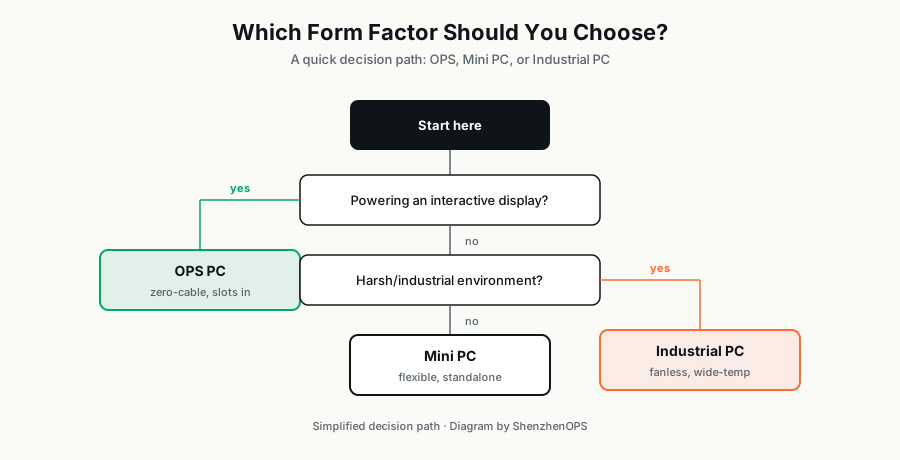
Quick decision flowchart
Does your display have an OPS slot?
- Yes → Choose OPS PC. The integration benefits dominate.
- No → Continue ↓
Is the deployment environment harsh (factory floor, outdoor, extreme temperatures, vibration)?
- Yes → Choose Industrial PC.
- No → Continue ↓
Does the display lifespan exceed 7+ years (e.g., signage installed for a decade)?
- Yes → Industrial PC for longer SKU availability.
- No → Mini PC is fine.
What we ship in each category
ShenzhenOPS catalogs six OPS configurations, three Mini PCs, and an Industrial PC (with custom variants for 200+ unit orders). If you describe your project — display brand, environment, deployment quantity, target country — we can usually recommend the right SZO product within an hour.
Not sure which form factor fits your project?
Send us your application details (display brand, deployment environment, quantity, target country) — we'll recommend the right SZO product and full pricing within 24 hours.
Ask Vincent on WhatsApp →