The 3 tablet categories most buyers actually need
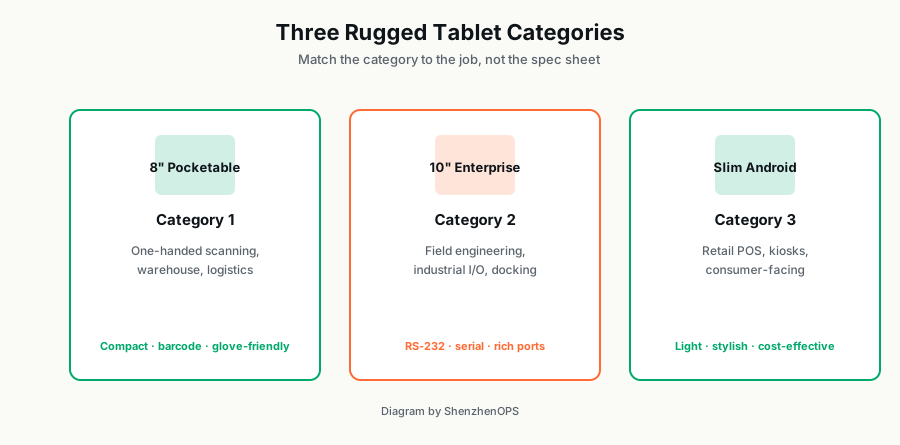
"Rugged tablet" covers a wide range. Before talking to suppliers, decide which of these three you actually need:
- Pocketable rugged Windows tablet (7-8 inch) — for one-handed scanning workflows: warehouse, inventory, healthcare rounds.
- Enterprise rugged Windows tablet (10-12 inch) — for industrial field service: utility inspection, logistics fleet, oil & gas, construction.
- Slim Android consumer-grade tablet (10-12 inch) — for retail POS, ticketing, customer-facing kiosks where industrial I/O isn't needed.
Each costs ~2x to 3x the next. Picking the wrong category wastes money in either direction.
Category 1: Pocketable 8-inch for one-handed work
What it solves
The worker is on their feet, moving, with one hand free at most. They're scanning barcodes, reading order picks, checking inventory levels, completing patient charts. Screen needs to be readable from arm's length, but small enough to hold one-handed for hours.
Key specs to look for
- Display: 7-8 inch IPS, 800-1000 nits brightness. Daylight readability matters for outdoor or warehouse use with overhead glare.
- Weight: under 700g. Above that, single-handed fatigue sets in within an hour.
- Battery: built-in 6,000-8,000 mAh, 6-8 hour real-world life. Most shifts are 8 hours; you want margin.
- Fanless thermal design. Fans collect dust; in warehouses and outdoors, dust kills tablets within a year.
- Gorilla Glass or equivalent. 7H hardness minimum; survives drops from ~1.2m onto concrete.
- Optional: NFC, 4G LTE. NFC for badge auth; 4G for offline-of-WiFi sync.
What you can skip
Don't pay for high-resolution displays (1080p is overkill for 8" screens running ERP apps). Don't pay for industrial I/O ports unless you actually need them. Don't pay for removable battery (8 hours is enough for a single shift; swap-pack adds weight).
SZO option
The SZO-TAB-8 is our Intel N5100-based 8" Windows tablet. 690g, Gorilla Glass third-gen, NFC and 4G optional. Default ship config is 8GB RAM + 128GB storage at ~$250 in 100-unit quantities.
Category 2: Enterprise 10-inch with industrial I/O
What it solves
The worker is in the field doing skilled work: maintenance, inspection, surveying, repairs. They need a full Windows environment (running specialized engineering apps), wired connectivity to legacy equipment (RS-232 serial, sometimes Ethernet), and the tablet has to survive being mounted in trucks, dropped from waist height, exposed to rain and dust.
Key specs to look for
- Display: 10-12 inch IPS, 800+ nits. Larger screen for detailed inspection data, P&ID diagrams, blueprints.
- Weight: under 1.2kg. Above that, daily-carry fatigue is real.
- Battery: removable + hot-swap. For shift work, the ability to swap to a fresh battery without rebooting is essential.
- Industrial I/O: RS-232 at minimum. Many legacy field equipment still uses serial. Aviation-spec multi-pin connector adds future flexibility.
- IP rating: IP65 minimum for outdoor use. Dust-tight and waterproof to low-pressure jets. Critical for utilities, construction, oil & gas.
- Drop spec: 1.5m+ to concrete. Real-world field drops from waist height shouldn't kill the tablet.
- Vehicle mount compatibility. PogoPin docks for trucks, forklifts, service vehicles.
What you can skip
If you don't need RS-232, skip the industrial I/O variant — saves $80-120/unit. If you don't need IP65, the lower-rated version is enough for indoor field service. Don't pay for high-end CPUs (i5/i7) unless your apps actually need them — Intel N100 is plenty for typical CMMS/ERP/FSM software.
SZO option
The SZO-TAB-10E is our enterprise 10.1" Windows tablet. Intel N100, removable battery, RS-232 + aviation plug, IP54 standard (IP65 custom for 200+ orders). $380-620 depending on config.
Category 3: Slim Android for retail and consumer-facing
What it solves
The user is a customer or a public-facing staff member: POS clerk, ticket inspector, hotel concierge, restaurant server. They need: smooth touch UI, full Google Mobile Services (Play Store, Maps, Firebase), 4G LTE for ubiquitous connectivity, NFC for contactless payment, GPS for location tagging. They don't need: rugged industrial I/O, Windows apps, removable battery.
Key specs to look for
- Display: 10-12 inch IPS, 500+ nits. Bright enough for shop floor / outdoor counter use.
- Form factor: under 16mm thick, under 800g. Slim profile matters for handheld retail and pocket carrying.
- Battery: built-in 10,000+ mAh, 10+ hour life. Full shift on one charge.
- 4G LTE: global band support. Especially B1/B3/B7/B8 (Europe), B2/B4/B5/B12 (US), B38/B39/B40/B41 (China/Russia).
- GPS quad-system. GPS + GLONASS + BeiDou + Galileo for accurate location anywhere.
- NFC: 13.56 MHz, supports 14443A/B/15693. For contactless payment and badge auth.
- GMS-certified. Some Chinese tablets ship without Google services pre-installed; verify before bulk ordering.
What you can skip
Industrial-grade ruggedization (IP65, MIL-STD drop tests) — typical retail use is indoor-soft-floor; spending on rugged spec wastes money. Windows OS — you'll mostly use Android apps anyway. Industrial I/O ports.
SZO option
The SZO-TAB-10S is our slim Android tablet. MT6765 octa-core, 14.5mm thick, 760g, 10-hour battery, full 4G LTE + GPS + NFC, Android 14 with Google Mobile Services. $180-290 depending on config.
Windows vs Android: the strategic choice
| Windows | Android | |
|---|---|---|
| App ecosystem | Enterprise software (SAP, Oracle, AutoCAD, Office) | Mobile apps + Google Play ecosystem |
| OS lifecycle | 10+ years (Windows IoT LTSC) | 5-7 years typical |
| Hardware cost | Higher (x86 Intel) | Lower (ARM) |
| Touch UX | Decent (Win 11), best on tablet PCs | Native, polished |
| Mobile device management | Microsoft Intune, group policies | SOTI, VMware Workspace ONE, Android Enterprise |
| Best for | Field engineering, healthcare, government | Retail POS, ticketing, consumer-facing |
IP ratings explained (briefly)
The IP rating tells you how protected the tablet is against dust and water. The first digit is dust; the second is water:
- IP54: protected against most dust (limited ingress); splash-proof from any direction. Sufficient for indoor light-industrial use.
- IP65: dust-tight; protected against low-pressure water jets. Suitable for outdoor and washdown environments.
- IP67: dust-tight; can survive temporary submersion in 1m of water. Required for some food-prep and oil/gas environments.
- IP68: dust-tight; continuous submersion. Rare in tablets; usually overkill for field service.
What's actually true about MIL-STD-810?
You'll see "MIL-STD-810" marketing claims on rugged tablets. MIL-STD-810 isn't a single test — it's a collection of 27 different test methods covering temperature, vibration, drop, humidity, etc.
A vendor claiming "MIL-STD-810 compliant" might have tested for one or two of the 27 methods. Always ask: which specific test methods did you pass, and what was the test setup? A reputable vendor can provide a third-party test report. If they can't, the claim is marketing.
For most field-service deployments, you don't need full MIL-STD-810H certification. You need: 1.2m+ drop survival, IP65 minimum, operating range matching your climate, and battery life matching your shift length. Vendor-attested testing on those four is sufficient.
Total cost: don't just look at unit price
A $250 cheap rugged tablet that fails every 14 months costs more than a $400 quality tablet that lasts 5 years. The bigger TCO line is RMA logistics: shipping defective units back to China, reissuing replacements, retraining users on new units when the original SKU goes EOL.
For 500+ unit deployments, the math overwhelmingly favors paying 20-30% more for known-quality hardware and longer guaranteed SKU availability.
Need rugged tablets for a fleet?
Send us your application (warehouse, field service, retail POS, healthcare) and target quantity. We'll recommend the right SZO-TAB variant and full pricing within 24 hours.
Send project brief →